Keep your brand
Your customers see your product, company and commercial offering.

Network bonding for Windows live-video products
StarBonding lets OEMs add multi-network live-streaming capability without building a bonding engine from scratch—or giving up control of their product experience.
Combine Ethernet, Wi-Fi, 4G/5G and tethered connections while keeping your own UI, branding, workflow and customer relationship.
Free to integrate: anyone may package and redistribute starbonding-cli.exe with personal, commercial or OEM applications.
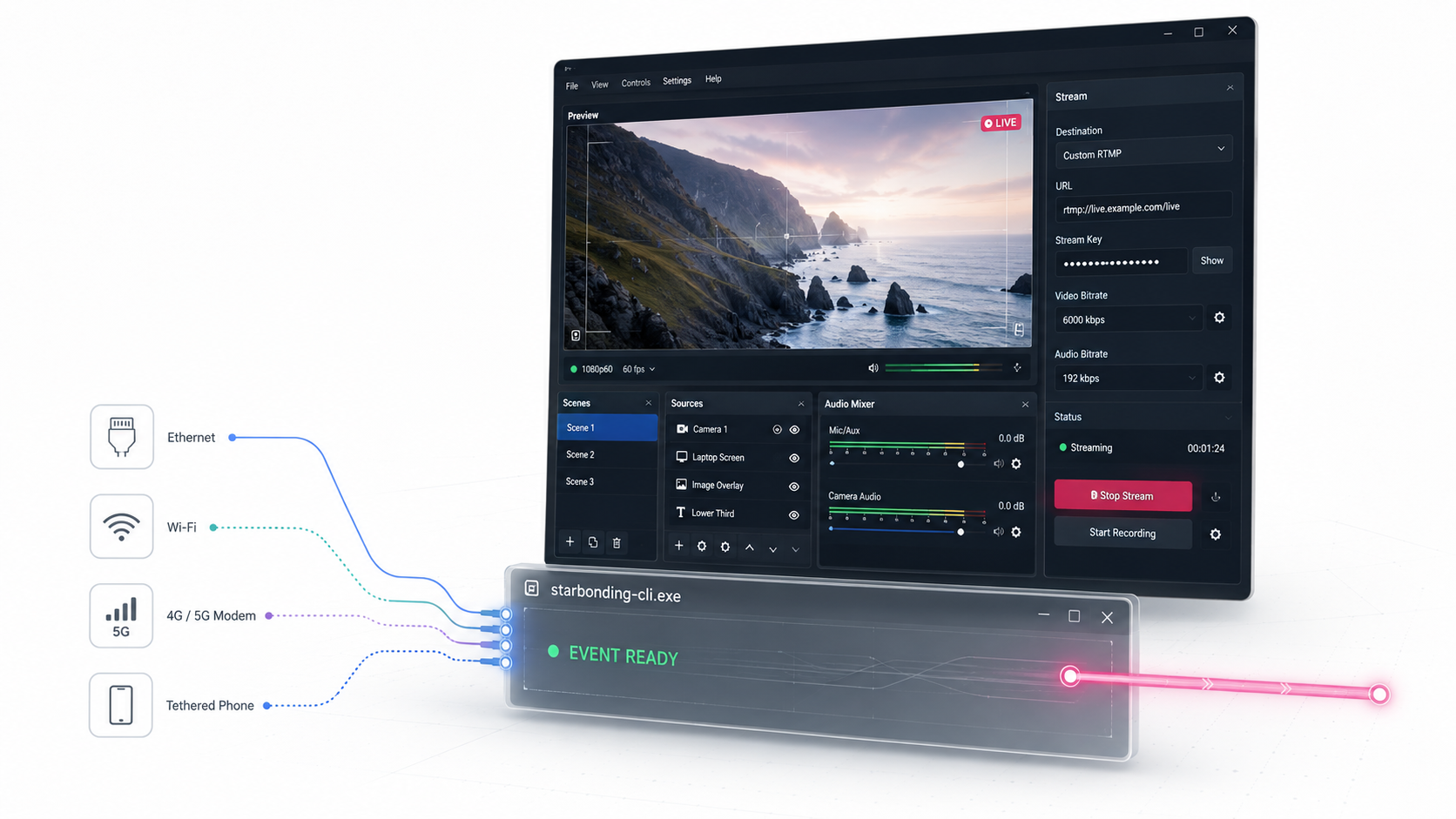
The OEM proposition
Do not spend years building and field-testing network bonding from scratch. Integrate StarBonding into your existing Windows product and give customers reliable multi-network live streaming without forcing them into another application or interface.
Your customers continue using the product they chose. StarBonding works underneath it as the specialized transport layer.
Your customers see your product, company and commercial offering.
Design the controls and monitoring experience your users require.
Integrate bonding into the encoder, camera or production flow you already operate.
Provision and renew their service from your own backend through the Partner API.
Built for companies creating live-video products
StarBonding fits products that already create, process, control or deliver live video on Windows.
Add bonding without developing network aggregation, recovery and delivery infrastructure yourself.
Give field operators bonded connectivity directly inside the workflow they already use.
Carry the finished live output across multiple available venue connections.
Bundle bonding, customer provisioning and service renewal into your commercial offering.
A simple integration boundary
Your Windows application keeps control of capture, encoding, graphics, automation and user interaction. It publishes one standard local RTMP stream to StarBonding.
StarBonding distributes that stream across available network adapters, reconstructs it through the StarBonding infrastructure and delivers it to the configured destinations.
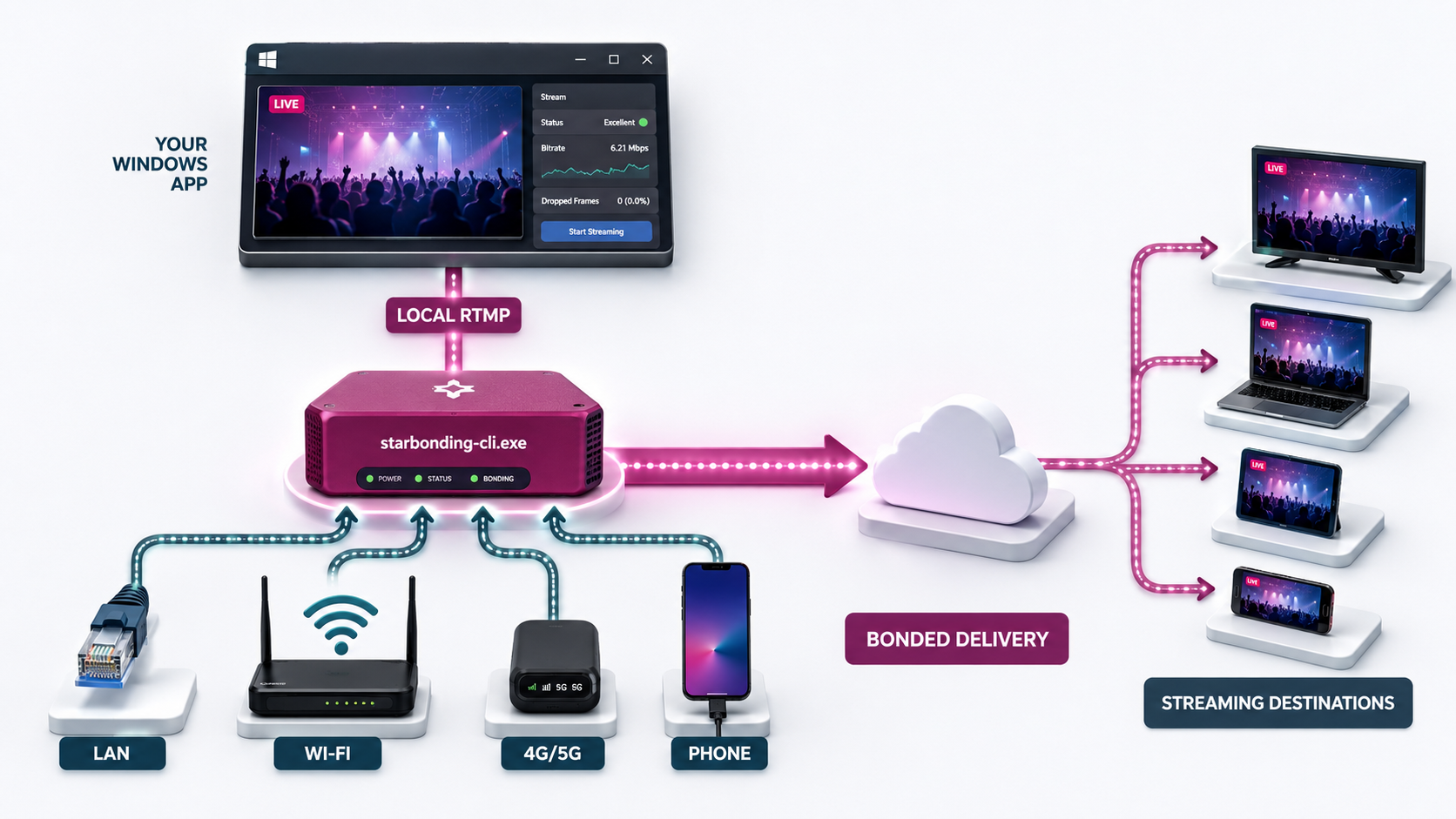
Start the CLI as a normal Windows child process and pass account credentials securely through stdin.
Read complete stdout lines and wait for the stable EVENT READY record.
Send H.264/AAC FLV to the local RTMP endpoint from your encoder or application.
Monitor structured events and stop cleanly through the named --stop-event.
Why integrate StarBonding?
One executable that your application can launch, supervise and stop.
Works with existing encoders and production pipelines through local RTMP.
Use Ethernet, Wi-Fi, cellular modems and tethered phones together.
No FFmpeg, GStreamer, SRS or separate RTMP server is required by the CLI.
Use our technology. Build your product.
StarBonding does not prescribe what your product should look like or how operators should use it. Build a focused field encoder, a full production system, a camera application, a sports workflow or a managed streaming product.
See runnable integration examples →Start from an open-source reference application
Use the production GUI as supplied, study its CLI integration, modify it, fork it or use it as the starting point for a completely different Windows bonding application.
The source includes the Win32 interface, CLI process supervision, public event and JSON consumption, adapter diagnostics, resources and CMake build files.
OEM commercial model
There is no fee or permission process for integrating the executable into your application. The commercial relationship begins when a customer uses the StarBonding bonding service.
Include starbonding-cli.exe, use your own GUI and branding, or start from the MIT-licensed official GUI source.
Create and renew managed customer accounts through the idempotent Partner API.
Service activations use your prepaid wallet and configured credit facility. Volume partner discounts provide margins of up to 66%.
Technical and commercial resources
Use the browser documentation, download the original Markdown for AI coding tools, or start from examples for C, C++, C#, Go, Java, Node.js, PHP, PowerShell, Python and Ruby.
Install the official Windows package, then integrate the included starbonding-cli.exe. Authentication, RTMP ingest, events, JSON, exit codes and process lifecycle are documented.
Services, wallet balance, account creation, renewal, transactions and idempotent retries. Request API access and wallet setup through StarBonding support.
Read Partner API →Download Markdown ↓Request API access →CLI and Partner API examples for C, C++, C#, Go, Java, Node.js, PHP, PowerShell, Python and Ruby.
View code examples →The official Win32 application source, build instructions, resources and license.
View GUI source →Download source ↓Common OEM questions
Yes. You may include and redistribute starbonding-cli.exe with personal, commercial or OEM applications. Your application may have its own branding, UI and workflow.
Yes. The official Windows GUI source is released under the MIT License and may be modified, redistributed, sublicensed or used in commercial products under that license.
Integration and redistribution of the CLI do not require payment. Actual bonding service usage requires an active StarBonding account provisioned under an available service plan.
Each active customer service is represented by a StarBonding account. Partners can create and renew those managed accounts through the Partner API.
Yes. The OEM controls the surrounding product, branding and customer experience. The CLI executable must retain its filename because that name is validated at runtime.
Bring bonding into your product
Start from the CLI documentation, the MIT GUI source or the runnable integration examples. For partner access and commercial support, contact the StarBonding team.